
Grayscale Vessel Landscape
R-134a Pressure Lookup Chart — Grayscale Vessel Landscape
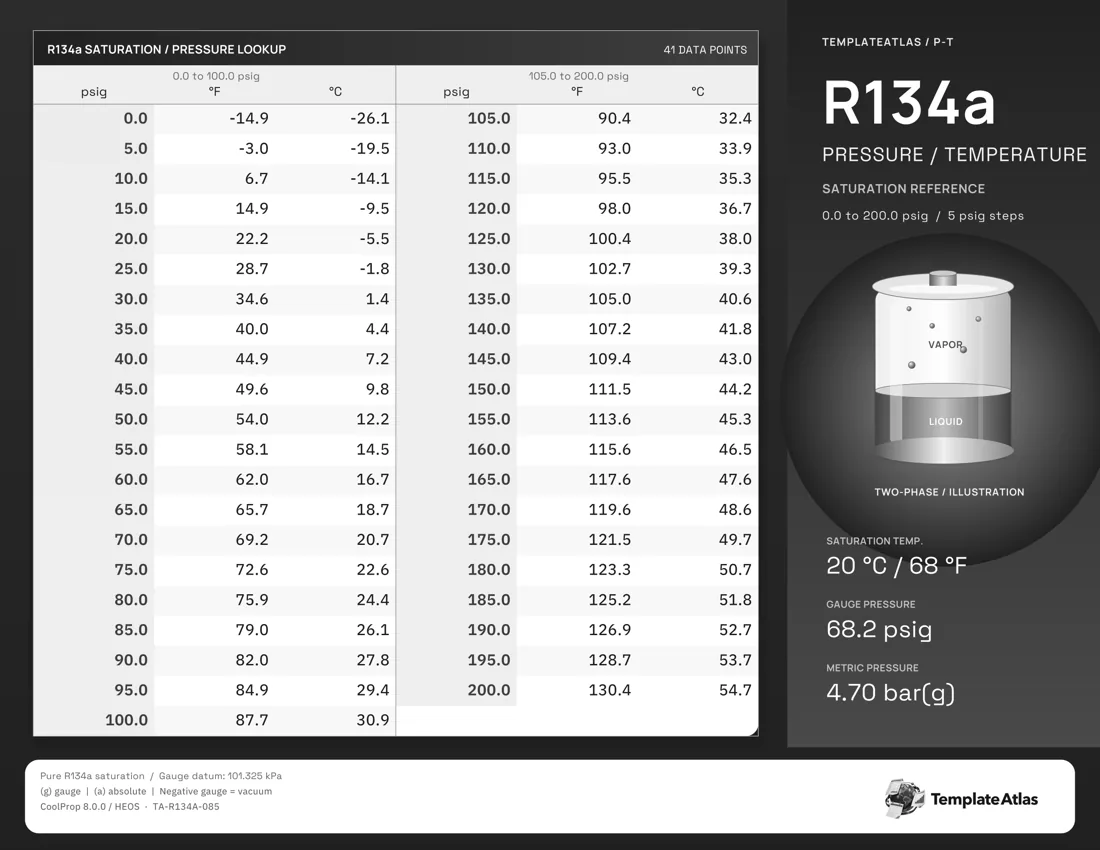
A grayscale vessel labeled for vapor and liquid sits in the right sidebar beside the pressure lookup table.
This version starts with gauge pressure rather than temperature. Find a listed psig value, then read across for the matching R-134a saturation temperature in Fahrenheit and Celsius; the 5-psi spacing makes the pressure steps easy to follow. This grayscale vessel landscape version covers 0 to 200 psig in 5-psi steps.
The equipment and reference-state panel sits on the right, leaving the landscape table together on the left. The 41 listed reference points use psi gauge, Fahrenheit, Celsius.
Using this reference
The PDF preserves the one-page print layout. The matching Image is a full-resolution WebP rendering. These are finished reference sheets with fixed data and illustrations.
Gauge pressure uses a 101.325 kPa atmospheric reference. Saturation values describe the refrigerant relationship; equipment instructions determine operating and charging targets.
File checksums
PDF SHA-256153fe5f3a34dc6be5898e7a49a7ae59a0f4226139f2c3bd33c047b7793fcb53b
WEBP SHA-256d3a5f1ff318db2961333fafe6b789e2d50d6b6cbefb8d3b8c563efe7093678e8
Data, sources, and credits
This collection uses CoolProp 8.0.0 / HEOS R-134a saturation data. The supplied method records comparisons with Arkema and Chemours reference tables.